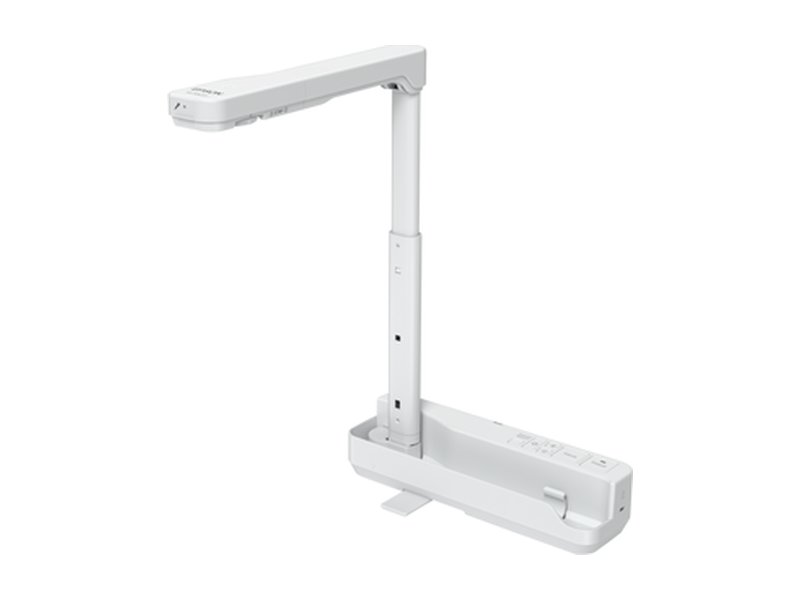
Hundreds of South African schools already teach with document visualisers supplied by JB Education. We help you choose the right visualisers, interactive panels, projectors, audio, and Parrot whiteboards and notice boards for your classrooms, and can add optional teacher training, quoted on request.
Optional teacher training add-on, quoted on request
Fits CSI and sponsor-funded projects
Our most popular classroom tool
Document visualisers
Put a worksheet, a textbook page, a learner’s work or a science specimen under the camera and the whole class sees it on the projector or panel. No scanning, no photocopying, no extra software.
Entry level
Epson ELPDC07
Light, portable starter visualiser
Full HD 1080p with 8× digital zoom
One USB cable for power and picture
Folds flat, LED light and built-in mic
Very low power draw (about 2.5 W)
A3 area
Epson ELPDC13
All-round classroom workhorse
Full HD, 16× digital zoom
A3 capture area: two textbook pages at once
Split-screen, SD card recording
Microscope adapter for science lessons
Epson ELPDC21
For close-up detail work
12× optical plus 10× digital zoom
Full HD at 30 fps, A3 capture area
Split-screen and SD card
Microscope adapter support
4K wireless
Epson ELPDC30
Wireless 4K visualiser
4K UHD, 13 MP camera, 230× zoom ratio
Connects to the display wirelessly or by Miracast
Records to USB storage (up to 32 GB)
Carry handle; A3 capture area
Elmo OX-1
Compact USB visualiser
Full HD over a single USB cable
8× digital zoom and built-in mic
Doubles as a webcam for online lessons
Plug and play: no drivers needed
Elmo MX-P3
Lightweight 4K, flexible arm
True 4K at 30 fps or Full HD at 60 fps
16× digital zoom at 4K
HDMI, VGA and USB outputs; SD slot
Only about 0.5 kg
Elmo TT-12G
Premium 4K classroom camera
12× optical zoom, up to 192× total
True 4K at 30 fps, Full HD at 60 fps
HDMI, VGA and USB; HDMI pass-through
Wireless display via Miracast
Elmo P30HD
Desktop visualiser with preview screen
16× optical and 8× digital zoom
Built-in LCD preview screen
HDMI output, native HD
Rigid base for heavy objects
WolfVision VZ-2.UHD
Robust entry-level 4K
4K UHD at 30 fps (60 fps at lower resolutions)
Simple controls, sturdy build
Suits in-class, online and hybrid lessons
Excellent image quality
WolfVision VZ-8.UHD
Lecture-hall and auditorium grade
Native 4K with 64× zoom
Records and streams at the same time
HDMI and HDBaseT outputs; network ready
Certified for Zoom Rooms
WolfVision VZ-C3D
Ceiling-mounted visualiser
Keeps the teacher’s desk completely clear
Light field shows exactly what the camera sees
60× zoom with dual lenses
On-board lesson recording
A touchscreen whiteboard, computer and display in one
Interactive flat panels
Large 4K touch panels with built-in Android and Google apps, whiteboard software and wireless screen sharing. Teachers write, annotate and open lessons straight on the board.
Latest range
Hisense GoBoard WE6GE
65″, 75″ and 86″
4K UHD touch display, 450 nits
Android 16, EDLA-certified (Google Play)
Built-in AI assistant for search and Q&A
Multi-touch writing and annotation
Hisense GoBoard WM6FEA
65″, 75″ and 86″, with camera
4K UHD touch display, 400 nits
Integrated 4K camera with privacy cover
Anti-glare, 9H scratch-resistant glass
Android, EDLA-certified
Hisense GoBoard 100″
For halls and large venues
Huge 100″ 4K display, 500 nits
Android 16, EDLA-certified
Ideal for school halls and staff rooms
Same easy GoBoard software
Add-on
Hisense OPS PC module
Windows inside the panel
Slots into the back of the panel
13th Gen Intel Core i5 or i7
Windows 11 Pro, Wi-Fi 6, Bluetooth 5.3
No separate desktop PC or cables
Add-on
Mobile panel stand
Share a panel between classrooms
Fits 65″ to 86″ panels
Three height settings
Lockable, silent 360° wheels
Laptop tray and hidden cable channels
Bright, big-picture options for any budget
Classroom projectors
From an affordable ceiling or table projector to ultra-short-throw interactive models that turn any whiteboard into a touch surface.
Interactive
Epson EB-760Wi
Interactive ultra-short-throw laser
4,100 lumens laser light, WXGA
Two pens at once; finger touch option
Mounts above the board: no shadows
Can control an Epson visualiser on screen
Interactive
Epson EB-770Fi
Interactive laser, Full HD
4,100 lumens, Full HD 1080p
Up to 100″ picture
Dual-pen interactivity, annotation tools
Long-life laser: no lamps to replace
Epson EB-695Wi
Interactive ultra-short-throw
3,500 lumens, WXGA
Finger touch plus two pens
Close-to-wall throw, less glare
Auto brightness and eco mode
Budget
Epson EB-W53
Affordable everyday projector
4,000 lumens, WXGA, 3LCD
Bright enough for daylight classrooms
Picture up to 375″
Compact and quick to set up
Add-on
Pull-down projection screen
100″ matt white, manual
Glass-fibre base fabric, flat picture
Other sizes and ratios available
Wall or ceiling mounting
For standard (not ultra-short-throw) projectors
Teach from anywhere in the room
Wireless screen sharing
Share a laptop, tablet or phone to the big screen without cables, and let learners show their work too.
ScreenBeam 1000 EDU Gen 2
Built for classrooms
App-free sharing: Miracast, AirPlay, Google Cast
Built-in collaborative whiteboard
Teacher moderation of learner screens
Works with any display
WolfVision Cynap Pure
No apps, no dongles
AirPlay, Miracast and Chromecast
4K UHD output at 60 fps
Bring-your-own-meeting for hybrid lessons
Simple, secure and reliable
Epson ELPWP20
Push-button sharing
Plug-in transmitter: one click to share
Up to four screens shown at once
Also supports Miracast and the free app
Connects to any HDMI display
So every learner can hear
Classroom audio
Clear sound for videos, online lessons and assemblies, from a pair of classroom speakers to a school-hall system.
Epson ELPSP02
Active projector speakers
Built-in amplifiers
Wall mounted
Works with any Epson projector
Fills a standard classroom
Vision SP-900P
Powered wall speakers
5.25″ woofer with dome tweeter
Volume control on the speaker
Tilting wall brackets or shelf use
Several inputs; easy install
Vision CS-1900P
Powered ceiling speakers
70 W built-in amplifier
Bluetooth for phones and laptops
Discreet, flush with the ceiling
Daisy-chain for larger rooms
Vision AV-1900
Mixer-amplifier for halls
Four mic or line inputs, mixed together
Bluetooth input
Made for school halls and lecture rooms
Professional audio controls
Record or stream a lesson
Cameras for hybrid lessons
Video bars with a wide-angle camera, microphones and auto-framing for online classes, staff meetings and parent evenings.
Hisense HC1E Vision Bar
4K camera and 8-mic array
50 MP camera with 4K output
Voice pickup up to 12 m
Auto-framing and voice tracking
Noise and echo cancellation
Boom Aura video bar
4K camera and speakerphone
4K at 30 fps, 120° field of view
AI auto-framing and voice tracking
Six microphones; plug and play
Three-year warranty
Parrot boards for every classroom
Whiteboards & writing surfaces
Hard-wearing Parrot whiteboards, glass boards and chalkboards for daily teaching, sized for anything from a small group corner to a full classroom wall.
Popular
Parrot slimline magnetic whiteboard
Everyday classroom whiteboard
Magnetic, dry-wipe writing surface
Slim aluminium frame with corner caps
Several sizes, small to full-wall
Wall-mounting kit included
Parrot magnetic glass whiteboard
Premium, ghost-free writing
Tempered glass that wipes clean every time
Takes magnets for notes and charts
Frameless modern look
Marker tray included
Parrot educational board system
Big teaching wall with side panels
Large centre board with hinged or side panels
Whiteboard or chalkboard panel options
Plain, lined or squared surfaces
Built for full classroom front walls
Parrot magnetic chalkboard
Classic chalk, modern build
Magnetic chalk-writing surface
Aluminium frame
Good for schools that prefer chalk
Range of sizes
Pin up work, notices and timetables
Display & notice boards
Notice and pin boards for classrooms, corridors and staff rooms, so learner work, timetables and school notices have a proper home.
Parrot bulletin board
Fabric pin board, aluminium frame
Pin-friendly ribbed fabric surface
Choice of fabric colours
Robust aluminium frame
Corridor and classroom sizes
Parrot combination board
Whiteboard plus pin board in one
Writing area beside a felt pin area
Saves wall space in smaller rooms
Large 2000 × 1200 mm option
Felt in a range of colours
Parrot cork info board
Compact notice board
Natural cork pinning surface
Aluminium frame
Handy for doors, offices and staff rooms
Small and medium sizes
Parrot calendar & weather board
Daily routine for younger learners
Printed calendar and weather layout
Magnetic, dry-wipe surface
Great for foundation phase morning rings
Slimline frame
For presenting anywhere
Flipcharts, easels & screens
Portable presenting kit for classrooms, halls and staff training: flipcharts, easels and projector screens.
Parrot magnetic flipchart
Whiteboard and paper pad in one
Magnetic whiteboard face with paper clamp
Height-adjustable legs
Folds away for storage
Good for workshops and group work
Parrot telescopic easel
Lightweight board stand
Holds boards and flipchart pads
Telescopic legs set the height
Steel build, folds flat
Easy to carry between rooms
Parrot tripod projector screen
Set up a screen in minutes
Free-standing tripod base
Large 4:3 viewing area
No wall mounting needed
Packs away after use
Parrot pull-down projector screen
Permanent classroom screen
Wall or ceiling mounted
Widescreen 16:9 viewing area
Pulls down when needed, rolls away after
Pairs with any classroom projector
Why buy through JB Education
More than a box on a desk
Schools don’t need more gadgets in cupboards. They need technology that teachers use every day. That’s what we focus on.
🎓
Optional teacher training
Want your staff confident from day one? Add our hands-on teacher training, drawn from our teacher professional development work. It’s an optional add-on, quoted on request.
🏫
Advice from educators
We are educators first. We recommend what suits your classrooms, timetable and budget, from a single visualiser to a whole-school roll-out.
🤝
CSI and sponsor projects
Equipment, installation and, if you choose, teacher training can be packaged into one CSI school-adoption proposal, with the reporting sponsors need.
🛠️
Support after the sale
One point of contact for delivery, installation, warranty queries and follow-up questions.
Get a quote
Tell us about your classrooms
Send us the products you’re interested in, how many classrooms, and whether you need installation or our optional teacher training add-on. We’ll come back with a recommendation and a quote.
Pricing is provided by quote only. Product specifications are a guide and may change; we’ll confirm the current model and availability with your quote. Brand names belong to their respective owners.